Email Notifications |
  
|
Email Notifications |
|
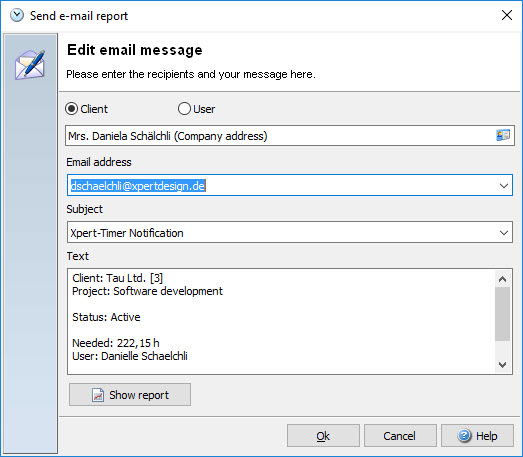
Send e-mails and report the status of your project (with an attached PDF-Report) to your colleagues simply through the email report function.
In order to use this function with your time bar you need to show the button "Send e-mail report", by right-clicking on your timebar.
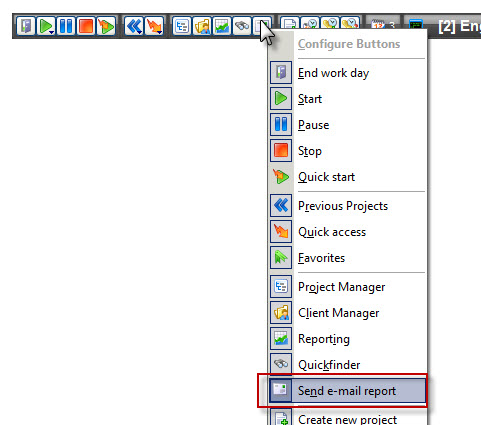
If you click on the button "Send e-mail report", you'll find multiple options to choose from:
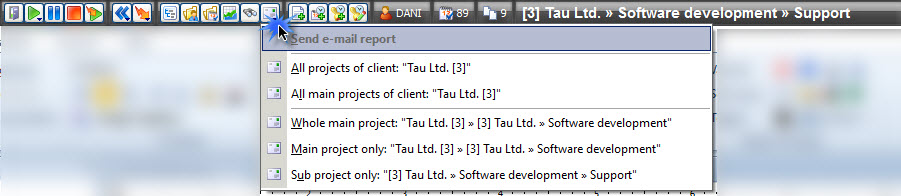
Select the report you want to send. You can choose between sending the complete main project, including all sub projects, the main project only, or only the running sub project.
You can also right click on a project and send the report from the context menu.

The next step is to choose the recipient of your e-mail. This might either be a client or a user in your Xpert-Timer system. You can change the text of email as well as the subject line to your needs. Use the button "Show report" to have a look at your report first before sending.